

To use AI at work, start with an approved tool and a low-risk task, such as drafting an email or summarizing a document. Give the tool clear instructions and relevant context, review its output for accuracy, and refine your approach. Build confidence through practice before expanding into more complex workflows.
Preparing employees to use AI in the workplace combines technical training with practical guidance and ongoing support. Organizations need to help employees understand where AI adds value, how to integrate it into daily workflows, how to evaluate AI-generated outputs, and when human judgment remains essential. Clear governance gives employees a foundation for responsible use as AI technologies evolve.
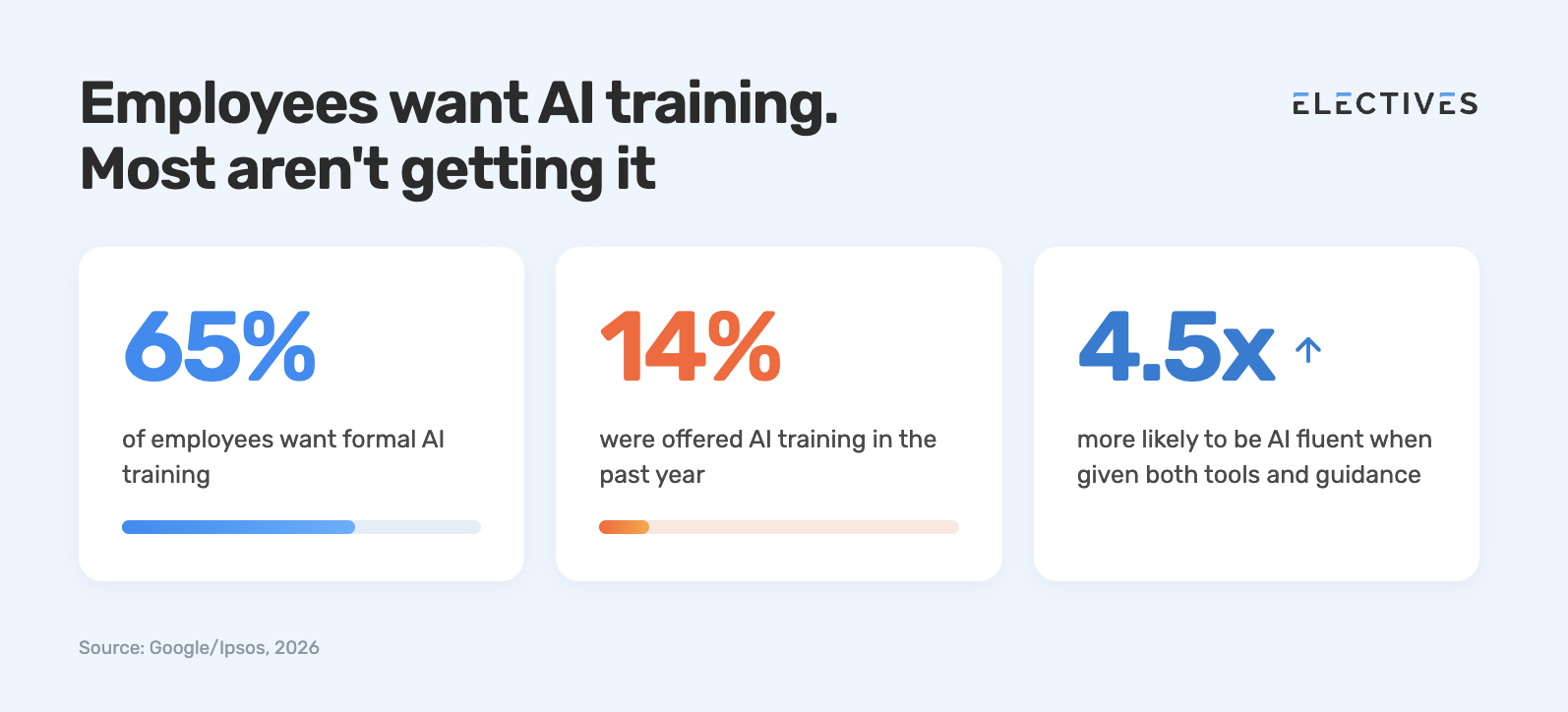
A Google/Ipsos survey published in February 2026 found that 65% of U.S. employees expressed interest in formal AI training, while 14% said their organization had offered AI-related training in the previous 12 months. The survey also found that employees offered both AI tools and guidance were 4.5 times as likely to be classified as AI fluent. These findings describe associations, and the employee survey was conducted in December 2025.
In this guide, you'll learn how to use AI at work and help your team build practical skills. We'll cover everyday use cases, responsible AI practices, and how organizations can design training programs that support sustained adoption and measurable changes in work.
How to use AI in the workplace
Employees can begin using AI by identifying the tasks that consume the most time and understanding where AI can provide practical assistance. The goal is to integrate it into workflows where it can improve efficiency, reduce repetitive work, and support better decision-making.
The easiest place to start is with routine, low-risk activities. Employees might use AI to summarize documents, draft emails, brainstorm ideas, organize meeting notes, or answer common questions. Use approved information and check the results as part of each practice task.
Organizations should also establish clear guidelines around approved AI tools, acceptable use, and data security before encouraging widespread adoption. Employees need to know what information can be shared with AI systems, when human review is required, and how AI fits into existing business processes. Clear governance gives employees practical boundaries for responsible AI use from the outset.
Plan for AI adoption as a gradual process with ongoing support. As employees gain experience, they can explore more advanced workflows, automate repetitive tasks, and test new ways to improve productivity. Starting small gives organizations opportunities to gather feedback and refine their approach.
Everyday ways to use AI at work
AI can support employees throughout the workday by helping with repetitive tasks, organizing information, and accelerating routine processes. The most useful applications vary by role and the tools available. Common starting points include:
- Writing and editing: Draft emails, reports, presentations, marketing copy, and other business documents before reviewing and refining the final version.
- Research and summarization: Summarize lengthy reports, meeting transcripts, articles, and policy documents to identify the most important insights quickly.
- Brainstorming ideas: Generate campaign concepts, project names, presentation outlines, product ideas, or alternative approaches to solving business challenges.
- Data analysis: Identify trends, explain datasets, compare information, and generate initial insights that employees can validate and interpret.
- Meeting support: Create agendas, summarize discussions, identify action items, and produce follow-up documentation.
- Customer communication: Draft responses to common customer inquiries, personalize outreach, and maintain consistent messaging across communication channels.
- Knowledge retrieval: Search internal documentation, explain complex policies, or surface relevant information from company knowledge bases.
- Workflow automation: Assist with repetitive administrative work such as categorizing information, generating templates, or preparing recurring reports.
These activities illustrate an important principle of workplace AI: employees remain responsible for reviewing outputs, applying professional judgment, and making final decisions. Build that review step into every AI-assisted workflow.
How to use generative AI at work
Generative AI can create new content, including text, images and code. Depending on the tool, employees can also use it to help prepare presentations, spreadsheets and other business assets from natural language prompts.
One of the most common uses of generative AI is content creation. Employees can use AI to draft emails, reports, blog posts, job descriptions, product documentation, marketing campaigns, and presentation materials. They can then review, edit, and refine the draft against their objectives and source material.
Generative AI also helps employees explore research questions and possible solutions. It can explain unfamiliar concepts, compare different approaches, summarize technical documentation, and propose ideas based on available information. Verify suggestions and sources before using them in business decisions.
For technical teams, generative AI can assist with writing code, explaining programming concepts, generating test cases, debugging software, and creating documentation. Teams should evaluate these outputs using their existing review and quality assurance processes.
Generative AI can produce inaccurate information, fabricate citations, or overlook important business context, risks addressed in NIST's Generative AI Profile. Employees should fact-check AI-generated content, verify calculations, protect confidential information, and apply critical thinking before using AI outputs in customer-facing or high-impact situations.
How to use AI by role or department
The most useful AI applications depend on each team's responsibilities and workflows. Ask employees to identify tasks where assistance would be valuable, then evaluate whether approved tools can support those tasks. Here are some common use cases for AI in the workplace:
- Marketing teams use AI to generate campaign ideas, create content outlines, analyze customer segments, optimize SEO strategies, monitor competitors, and summarize campaign performance.
- Sales teams use AI to research prospects, prepare for meetings, draft personalized outreach, summarize customer conversations, and prioritize opportunities based on available data.
- Customer support teams use AI to suggest responses, summarize support tickets, recommend knowledge base articles, categorize requests, and help agents resolve issues more efficiently.
- Human resources teams use AI to write job descriptions, screen resumes, prepare interview questions, summarize candidate feedback, answer common employee questions, and support learning and development initiatives.
- Finance teams use AI to analyze financial data, generate reports, identify anomalies, forecast trends, and automate repetitive reporting tasks while maintaining human oversight for financial decisions.
- Software development teams use AI to generate code, explain unfamiliar frameworks, identify bugs, create documentation, generate test cases, and improve development efficiency without replacing code reviews or quality assurance.
- Operations teams use AI to automate workflows, analyze operational data, improve resource planning, monitor performance, and identify process improvement opportunities.
While the use cases differ by department, the underlying objective stays consistent: help employees spend more time applying expertise, solving problems, collaborating with colleagues, and delivering value to customers. Encourage each team to identify role-specific AI use cases that fit its workflows and review requirements.
Building a strong technical foundation
AI training for employees should begin with foundational instruction in data literacy, AI basics and privacy expectations. Equip your team with the skills to interact with AI tools, including an understanding of how inputs and context can influence outputs.
Electives offers AI training and simulations to help employees build confidence and competence. Basic instruction can then be layered with more advanced AI strategies to prepare employees for using AI technologies effectively and responsibly in their roles.
Mastering the art of prompt engineering + asking the right questions
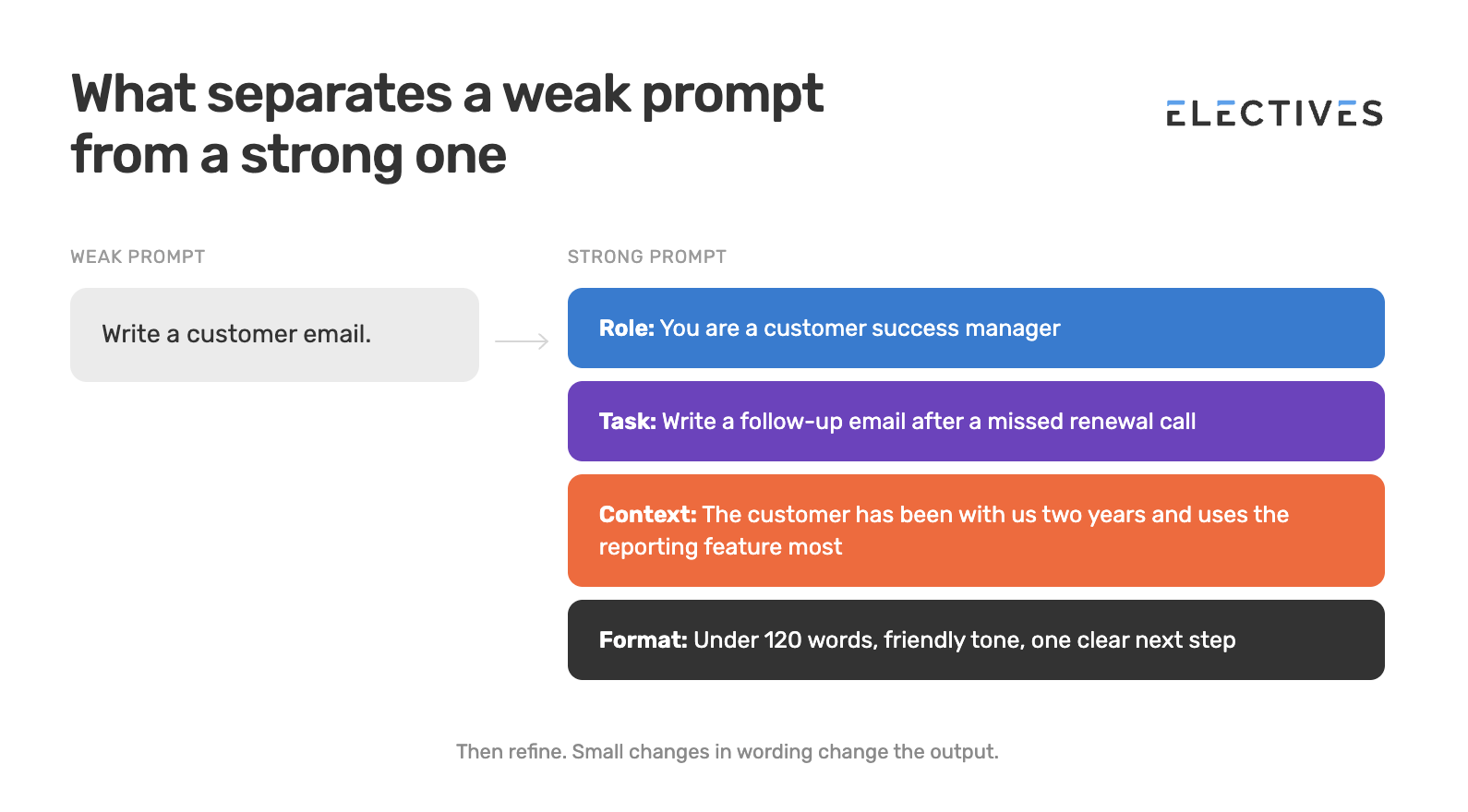
Communicating clearly with AI systems starts with defining the task and asking useful questions. Prompt training should teach employees how to specify objectives, provide context and request an appropriate output format.
Start with the basics: show employees how open-ended, specific or conditional prompts can lead to different outcomes. Encourage experimentation so they can compare results after small changes in wording. Pair this practice with critical thinking and a clear review process.
For example, try: "Using the approved project notes below, draft a follow-up email for the project team. Include decisions, action owners and deadlines in a short bullet list, and flag missing details for me to check." Compare the draft with the original notes, correct any errors, and refine the prompt if it misses important information.
Advanced training should cover refining prompts based on feedback and iterating to improve relevance over time. Ask employees to explain why an output meets the task's requirements and what they checked before using it.
Empowering employees to configure reusable AI assistants
For recurring tasks, teach employees to document reusable instructions, approved reference material and a clear output format. Choose the assistant-building features available in your organization's approved tools, and check current product documentation before designing a workshop.
For ChatGPT-specific training, consult OpenAI's current configuration and availability guidance, since creation and editing options depend on product availability and workspace permissions. Keep the learning objectives focused on defining a purpose, writing clear instructions, choosing approved knowledge sources and testing results.
Encourage employees to explore a specific workflow, such as preparing a recurring report or drafting customer communications. Have them test realistic examples, document limitations and agree on the human review required before sharing the assistant with colleagues.
Optimizing workflows and AI integrations
Integrating AI into existing workflows starts with understanding how work gets done today. Training should focus on identifying where AI can add value within current processes, whether through repetitive task support, decision preparation or data analysis.
Start by mapping out existing workflows and pinpointing areas where AI could help. Gallup's April 2026 workplace AI research, based on a February survey of U.S. employees, found that frequent AI use was associated with:
- AI fitting existing systems and processes
- Managers actively supporting AI use
- Organizations encouraging experimentation.
Then, train employees on the approved integration options relevant to their roles. Technical teams may need to work with APIs that connect AI platforms with CRM systems, project management tools or communication apps. Assign responsibility for monitoring and adjusting integrations as business needs evolve.
For each workflow, document the task, the information AI can access, the expected output and the person responsible for review. Test the process with a small team before expanding it, and use their feedback to refine the handoffs.
Solving complex problems with AI
Provide your employees with problem-solving frameworks that incorporate AI capabilities. Teach them how to break down large, complicated issues into smaller tasks that AI can assist with. Encourage employees to approach problems from multiple angles, compare possible solutions and check the evidence behind each suggestion.
Verifying AI insights with human judgment
Making sense of AI-generated analysis requires logical thinking and reliable evidence. Employees should assess whether conclusions align with business goals, whether the underlying data is reliable and whether the output accurately represents that data.
Train employees to check important claims against original sources and verify calculations independently. Ask them to identify missing context, unsupported assumptions and situations that require specialist review before making decisions.
Responsible AI use in practice (do's and don'ts)
Using AI effectively at work includes understanding its limitations and following company policies. Employees should review outputs critically and understand who is accountable for final decisions. The following practices provide a starting point for team guidance.
Do
- Verify AI-generated information: Always fact-check important claims, statistics, calculations, and references before using AI-generated content in reports, presentations, or customer communications.
- Apply your judgment: Review AI recommendations and patterns, make business decisions within your responsibilities, and approve final outputs.
- Protect confidential information: Only use approved AI tools and follow company policies when handling customer data, financial information, intellectual property, or other sensitive business information.
- Provide clear prompts and context: State the task, intended audience, relevant source material and desired output format, then evaluate the result.
- Be transparent when appropriate: If AI contributes significantly to customer-facing content or business deliverables, follow your organization's disclosure and governance policies.
- Continue learning: AI capabilities evolve rapidly. Regularly updating your knowledge helps you take advantage of new features while understanding their limitations.
Don't
- Don't assume AI is always correct: AI models can generate inaccurate information, outdated recommendations, fabricated citations, or misleading conclusions with confidence.
- Don't upload sensitive or regulated data into unauthorized AI tools: Customer records, confidential business information, proprietary code, and regulated data should only be used in systems approved by your organization.
- Don't use AI without reviewing the output: AI-generated content should always be edited for accuracy, tone, context, and compliance before it is shared internally or externally.
- Don't rely on AI for high-risk decisions without human oversight: Decisions involving hiring, legal matters, finance, healthcare, cybersecurity, or regulatory compliance require appropriate human review and accountability.
- Don't ignore bias or fairness concerns: AI systems can reflect biases present in their training data. Employees should evaluate outputs carefully to ensure they are objective, inclusive, and appropriate for the intended audience.
- Don't treat AI adoption as a shortcut around expertise: Apply domain knowledge, professional experience and critical thinking when evaluating AI-assisted work.
Ethics as a foundation
As your team implements AI, include ethical considerations in training and workflow reviews. NIST's generative AI risk guidance addresses issues including harmful bias, data privacy and human-AI interactions. Use ongoing discussions to help employees recognize potential harms and raise concerns through your organization's established channels.
Leading with emotional intelligence
Preparing employees to work with AI calls for creativity, ethical awareness and emotional intelligence alongside technical skills. Employees need opportunities to discuss uncertainty and consider how changes to work affect colleagues and customers.
Leaders can create an environment where empathy, self-awareness and workplace power skills are valued alongside technical competence. Encourage employees to ask questions, listen to concerns and consider the human impact of AI-assisted decisions.
Activating creative collaboration
Create spaces, both physical and virtual, where teams can brainstorm, experiment and iterate together. Ask employees to use AI to generate possible approaches, then discuss which ideas are useful, feasible and appropriate. Capture what the team learns so colleagues can build on the work.
Fostering creativity + innovation
Give employees opportunities to explore how AI might support creative work in their roles. Workshops, innovation challenges and a company culture that welcomes new ideas can provide a structure for experimentation. Ask teams to test promising ideas against a clear business need.
Emphasizing collaboration
AI tools often require input from multiple disciplines. Bring employees from different business areas together to test proposed workflows and identify gaps in context or expertise.
Promote cross-functional collaboration when teams evaluate and implement AI. Agree on shared responsibilities, review requirements and a way to report problems as the workflow develops.
Employee training for AI adoption: Rollout and measurement
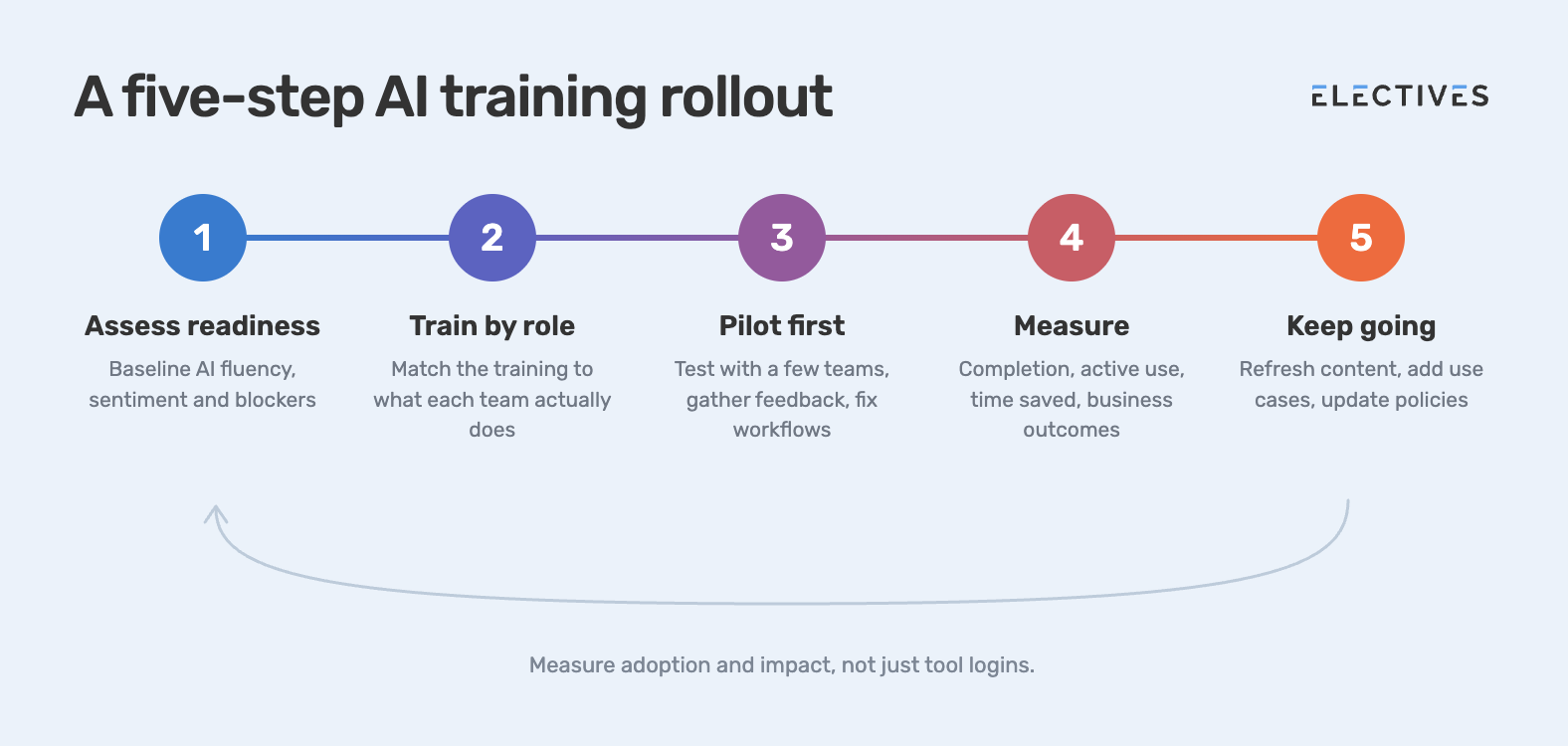
To support meaningful adoption, companies need a structured training program that equips employees with the skills, confidence, and support to use AI in daily work. Plan the rollout around technical training, change management, clear governance and continuous measurement. Give managers a clear role in supporting practice and reviewing how work changes.
Start with a workforce readiness assessment
Before launching an AI training program, organizations should evaluate their current level of AI readiness. This includes assessing employees' AI literacy, identifying role-specific use cases, reviewing existing workflows, and understanding where AI can deliver the greatest impact. A baseline assessment helps prioritize training efforts and establishes benchmarks for measuring future progress.
Deliver role-based AI training
Training should reflect the responsibilities of each department and focus on practical applications employees can immediately incorporate into their work. For example, marketers may practice content creation and audience analysis, while finance teams practice reporting and checking analytical outputs. Use realistic tasks, feedback and follow-up practice to connect learning with each team's responsibilities.
Roll out AI in phases
Use pilot programs to test AI tools, refine workflows, gather employee feedback, and identify governance challenges before expanding adoption across the business. Document what worked, where employees needed support and what should change before the next phase.
Measure adoption and business impact
Tracking AI adoption helps organizations assess whether training is changing everyday work. Monitor employee engagement, demonstrated skills and business outcomes alongside tool usage. Useful metrics include:
- AI training completion rates
- AI literacy or proficiency assessment scores
- Percentage of employees actively using approved AI tools
- AI adoption by department or role
- Time saved on routine tasks
- Output accuracy, quality and rework
- Employee confidence when using AI
- Employee satisfaction with AI tools
- Number of successful AI use cases implemented
- Business outcomes such as faster project delivery, improved customer satisfaction, or reduced operational costs
For each pilot, define a task and record its completion time and quality before training. Repeat the comparison after employees have practiced, including time spent reviewing and correcting AI output. Track whether employees consistently use the agreed workflow, and review differences by role or department.
Continuously improve the training program
Organizations should regularly update learning materials, introduce relevant AI use cases, refresh governance policies, and provide opportunities for employees to practice new skills. Collect employee feedback and review adoption metrics to keep training aligned with business needs and technological changes.
Testing + iteration
Preparing employees to use AI effectively involves promoting a mindset of continuous improvement. Train employees to test AI applications, gather feedback and refine their methods as tools and workflows change.
If you are rolling out AI training at scale, start with a baseline of employee AI fluency, sentiment, blockers and role-specific needs. Once you know where employees are confident, skeptical or stuck, build a program with live expert-led classes, practice opportunities and reinforcement. Use the baseline to evaluate progress and identify where further support is needed.
AI offers real opportunities, and preparing employees requires a combination of technical capability and human-centric skills. Electives helps HR and People teams build AI-first organizations by bringing live learning, realistic practice and analytics together in one platform.